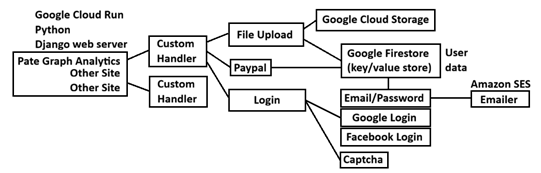
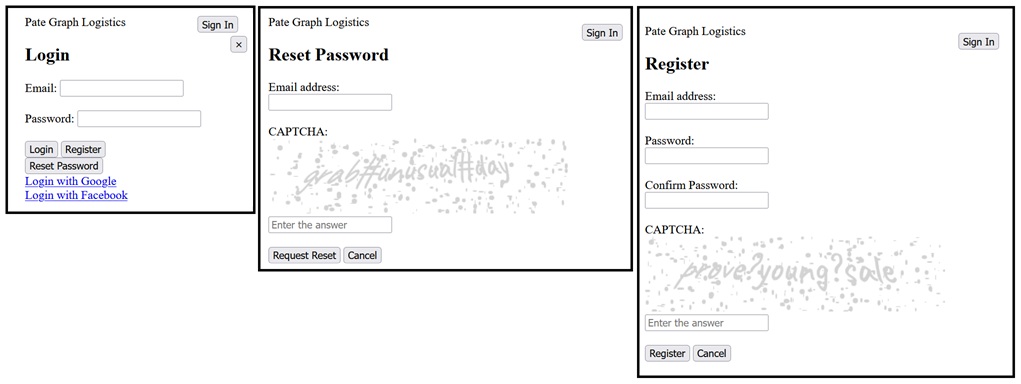
We realised at this point we should really find a way make the web-site design as efficient and agile as possible. We wanted to come up with a way of freeing our web and UI designers to allow them to operate independently of our processing development team. This will allow us to turn-around features and get them out to you even more quickly and efficiently. This meant a complete change in the overall architecture and implementation, which we will now briefly take a look at.
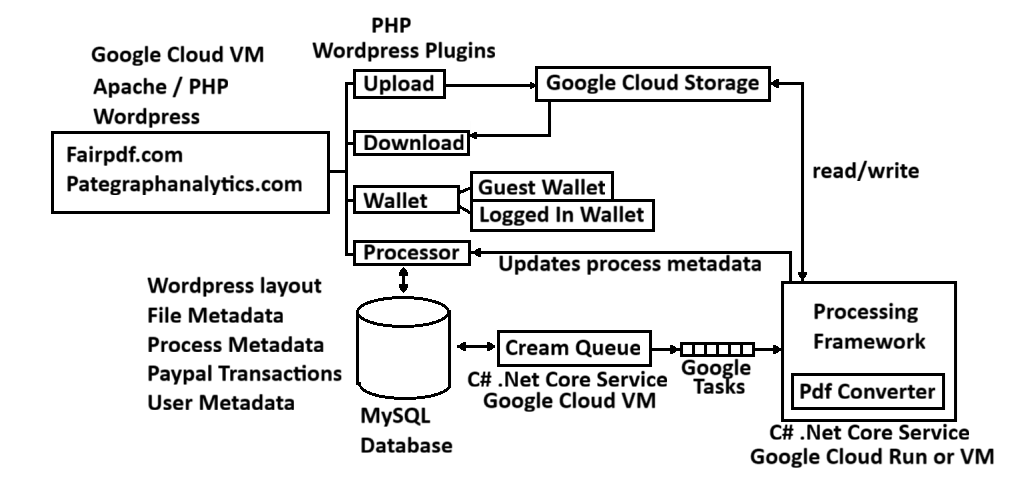
We switched to a implementing the front-end using WordPress which is a PHP based content-management framework where page content and layout is stored in a database and rendered dynamically. Now we had a relational database we might as well switch to holding all our user, file and process metadata there too.
WordPress was initially designed for rendering blogs, but now is what is behind many e-commerce platforms such as Shopify. It does not out of the box do things we need it to do such as uploading to user files to cloud storage or list or delete those files, so we needed to write our own plugins to implement those bespoke features in PHP. We also implemented a guest wallet so users can try before they buy. On the plus side now we were using WordPress we are able to leverage popular off-the-shelf plugins to do standard things like user management and payment integration.
Behind WordPress we have a couple of micro-services. The first is a “Cream Queue” responsible for finding new work users have generated and queuing that work fairly to our processing framework. It is also responsible for housekeeping tasks such as removing expired files.
Following that we have a scalable processing framework which interprets the tasks and passes them to the appropriate processing module. If also provides services to the modules such as fetching files from cloud storage as well as storing the resulting files and messaging the front-end when processing has completed.
Although our building-out has taken us a while (several months) adding a new process just requires us to write the processor for it (in any language) tweak the cream-queue config slightly. Then finally all we need to do is quickly add a new page to WordPress using our existing plugin (short-codes) that allows the user to upload files for the new process. In the coming months we will be focusing on releasing all of this and adding new processes and services.
If there is a process you would like us to consider, please head over to our Suggestions/Feedback page and let us know.